
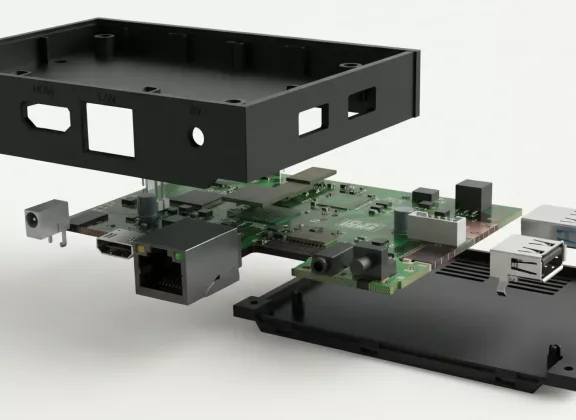
When choosing an IPTV set-top box, buyers often focus on technical specifications such as the number of CPU cores, RAM capacity, Wi-Fi speed, or 8K resolution support. Manufacturers use these specifications to compare devices, but higher numbers do not always translate into better viewing quality. For IPTV, compatibility with the television service, support for the required video codecs, and a stable network connection are far more important.
In this article, we examine TV set-top box specifications from a practical perspective. We explain how hardware video decoding, RAM, and network interfaces affect performance and compare the MAG540w3, MAG544w3, and MAG555 — three models available from the US Infomir Store.
CPU, RAM, and Video Decoder: What Affects IPTV Performance?
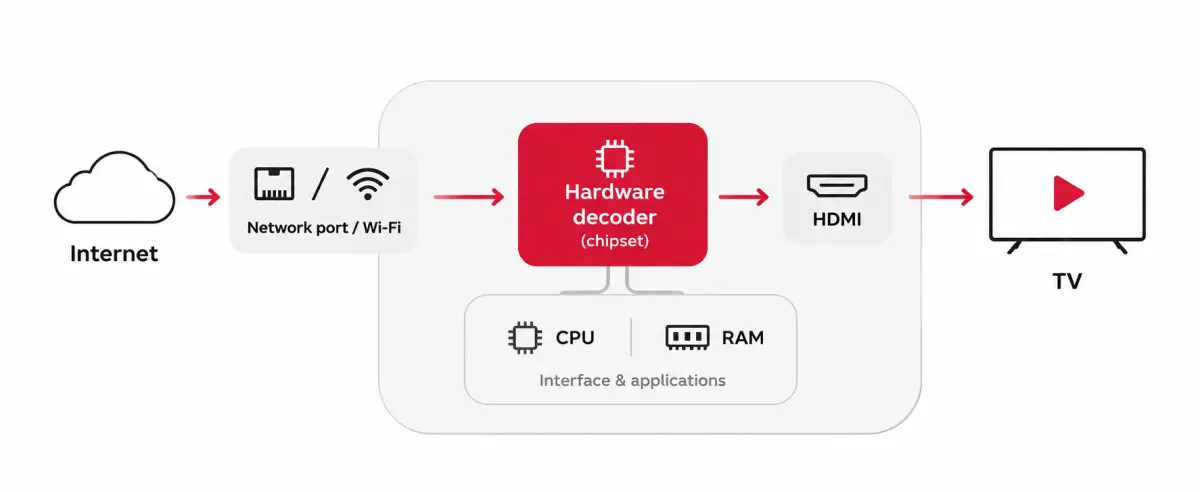
A modern TV set-top box uses its processor to run the operating system, user interface, and applications. However, in most of these devices, video streams are processed by a dedicated hardware decoder integrated into the chipset. Its capabilities largely determine which video formats and resolutions the set-top box supports.
Therefore, when choosing a device for watching TV channels, you should not focus solely on the number of CPU cores. A quad-core processor with a suitable hardware decoder can deliver stable IPTV playback without requiring a more powerful octa-core solution. You can learn more about evaluating component performance in our guide to benchmarking CPUs, GPUs, and video decoders.
The MAG540w3 and MAG544w3 are built on the Amlogic S905Y4 platform, while the MAG555 uses the Amlogic S905Y4-B. These chipsets offer comparable hardware video decoding capabilities, so the operating system and available features should be the primary considerations when choosing between these devices.
RAM also serves different purposes depending on the software platform. In Linux-based set-top boxes, it supports the IPTV portal and system processes. The MAG540w3 and MAG544w3 come with 1 GB of RAM and 4 GB of internal storage, which is sufficient for the use cases intended by the manufacturer.
The MAG555 runs Google TV, providing access to streaming applications, personal profiles, and additional platform features. To support these functions, the device has 2 GB of RAM and 16 GB of internal storage. Therefore, more RAM is not inherently better; its value depends on the requirements of the operating system and applications.
Video Codecs and 4K: Why Compatibility Matters More Than Maximum Resolution
Even a powerful set-top box cannot play a video stream correctly if its decoder does not support the compression format being used. That is why the list of supported codecs is one of the most important specifications of IPTV equipment.
H.264, HEVC, and AV1. H.264 remains a widely used video compression standard. Its successor, H.265 (HEVC), can deliver comparable video quality at a lower bitrate, which is particularly useful for high-resolution content. AV1 is a newer standard also designed for efficient video compression.
The MAG555 supports HEVC and AV1. The specifications for the MAG540w3 and MAG544w3 list AV1 support, while HEVC support for certain modes is marked as optional. Before purchasing, it is advisable to check with your IPTV provider which video formats are used for TV broadcasts.
4K and frame rate. Support for 4K resolution means that the set-top box can output video at that resolution. However, playback quality also depends on the characteristics of the video stream, the television, and the application being used.
A frame rate of 60 frames per second is particularly important for fast-moving scenes, sports broadcasts, and other dynamic content. The MAG555 supports 4K HDR playback at up to 60 fps. However, the set-top box cannot automatically increase the original frame rate of a broadcast: if a service delivers video at 30 fps, an output mode of 60 Hz does not turn it into genuine 60 fps video.
To watch content in 4K, every component of the system must support the required resolution, including the set-top box, television, HDMI connection, and streaming service. In addition, some platforms offer access to Ultra HD only with certain subscription plans. Therefore, before purchasing a set-top box, you should check not only its specifications but also the requirements of the services you intend to use.
Ethernet or Wi-Fi: Which Connection Is Better for Stable IPTV Streaming?
IPTV quality depends not only on the set-top box but also on the performance of your home network. If the connection speed is insufficient for the video stream or data packets are frequently lost, you may experience playback interruptions, delays, and reduced picture quality.
The required bandwidth depends on the resolution, video codec, and bitrate of the specific service. For example, Netflix recommends a connection speed of at least 15 Mbps for 4K streaming, while YouTube recommends approximately 20 Mbps. These figures can serve as general guidelines, but IPTV providers may have different requirements.
In the United States, households can access the internet through cable, fiber-optic networks, fixed wireless access, and other technologies. However, for IPTV, the type of broadband connection matters less than the actual stability of data transmission to the television.
The MAG540w3, MAG544w3, and MAG555 feature Ethernet ports with speeds of up to 100 Mbps. This bandwidth is sufficient for most IPTV streams, including 4K content at an appropriate bitrate. All three models also support dual-band 802.11ac Wi-Fi.
If your router is located near the television, a wired connection is generally preferable. It is not affected by wireless channel congestion, signal strength, or physical obstacles between devices.
Wi-Fi is more convenient for a bedroom, kitchen, or another room without an Ethernet connection. However, actual wireless performance depends on the distance from the router, wall thickness, device placement, and interference from neighboring networks.
In large, multi-story American homes, Wi-Fi coverage in distant rooms can become a greater limitation than the speed of the internet plan itself. Before purchasing a new set-top box, check the connection directly where the television is installed. In some cases, repositioning the router or improving the home Wi-Fi network will make a greater difference than replacing the media player.
Which TV Box Specifications Are Actually Useful and Which Are Overrated?
Media player manufacturers often highlight their devices’ maximum technical specifications to emphasize their advantages. However, these specifications should be evaluated based on how the device will actually be used.
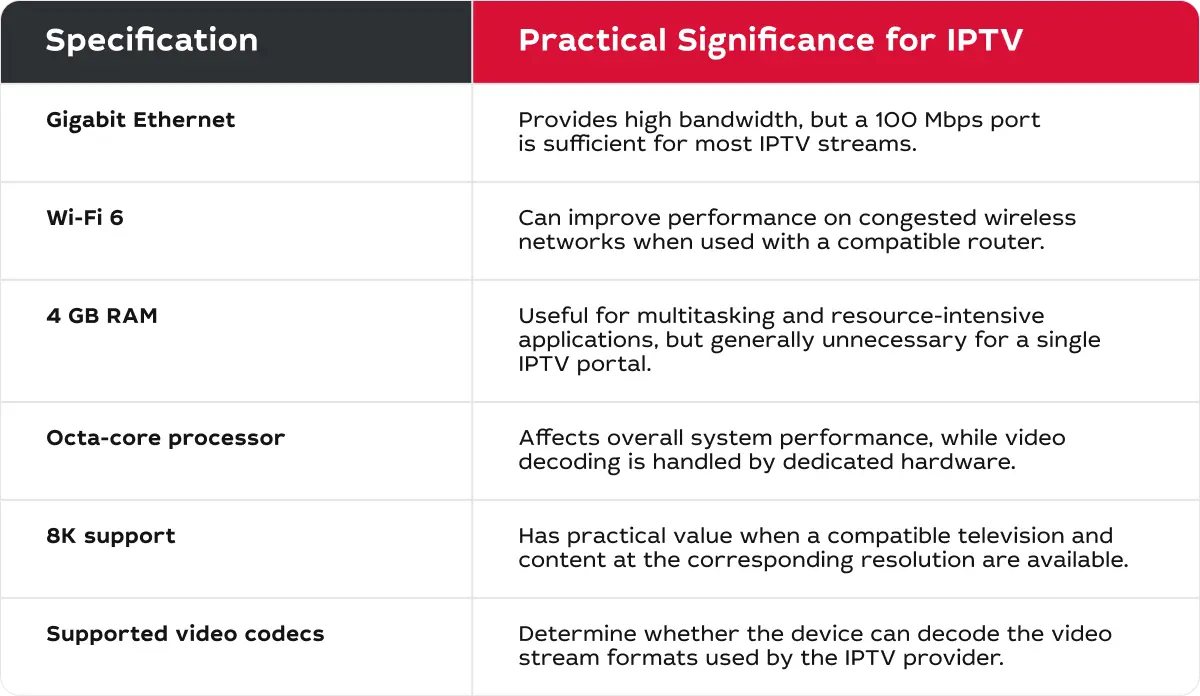
It is equally important to understand the differences between software platforms. Linux-based MAG set-top boxes are primarily designed for watching IPTV through an operator’s portal. This option is suitable for users who want a straightforward interface with TV channels and an electronic program guide.
Google TV offers a different experience. The MAG555 allows users to install compatible applications from Google Play, use personal profiles, and search for content by voice through Google Assistant. This makes it a convenient choice for households that watch content across multiple online services.
However, having Google TV does not automatically provide access to paid channels or subscriptions. For example, using Netflix, YouTube TV, or other services may require separate registration, payment, and verification of app compatibility.
Before purchasing, it is also worth checking how long the device will receive software support. Operating system and application updates affect compatibility with streaming services, security, and operational stability. You can learn more in our guide to evaluating the lifecycle of a streaming device.
Which MAG Set-Top Box Should You Choose in the US? Model and Price Comparison
The us.infomir.store online store offers Linux-based IPTV set-top boxes and Google TV media players. When choosing a device, consider its connectivity options, the requirements of your IPTV service, and whether you need additional applications.
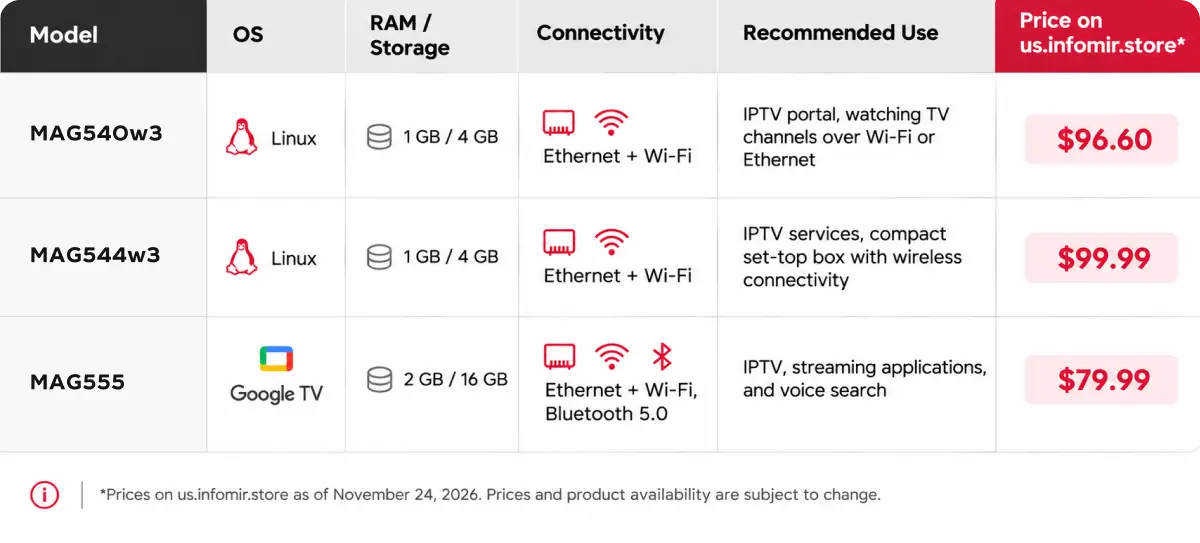
The MAG540w3 and MAG544w3 are suitable for watching TV channels through a compatible IPTV portal. They are designed for users who need access to television broadcasts without the additional features of a full app-based platform.
The MAG555 is worth considering if you use your television not only for IPTV but also for watching movies, TV series, and videos through popular streaming services. Additional advantages include Google TV, Bluetooth 5.0, and 4K HDR support.
Buying MAG Set-Top Boxes in the US. Infomir Store ships devices directly from its US warehouse. Product prices already include import duties and tariffs, so customers in the United States do not need to pay additional import-related customs fees.
When placing an order, check the final price, available payment methods, and delivery terms for your address. The store also offers MAG multi-device packs for customers purchasing several set-top boxes.
Your choice of model should primarily depend on compatibility with the service you use. Additional features are worthwhile only if you actually need them for everyday viewing.
When choosing an IPTV set-top box, focus on the features that directly affect viewing quality: video codec support, connection stability, and compatibility with your TV service. A more powerful CPU, additional RAM, or support for newer networking standards do not always provide noticeable benefits when watching regular TV channels. Linux-based MAG models are suitable for IPTV portals, while the MAG555 with Google TV offers greater flexibility for streaming applications. Compare device specifications and prices at Infomir Store and choose a set-top box that matches your viewing needs and home network.
FAQ
1. What are the most important specifications when choosing an IPTV set-top box?
First, check the supported video codecs, compatibility with your IPTV provider, and network connectivity options. CPU performance and RAM capacity are important for running the operating system and applications, but they do not always directly determine TV playback quality.
2. Is 1 GB of RAM enough for IPTV?
For a compatible Linux-based IPTV portal, 1 GB of RAM may be sufficient. For example, the MAG540w3 and MAG544w3 use this configuration. Google TV and its applications have higher memory requirements, which is why the MAG555 comes with 2 GB of RAM.
3. Can I watch IPTV in 4K over Wi-Fi?
Yes, provided the connection offers sufficient speed and stability. However, when the wireless signal is weak or the network is heavily congested, Ethernet generally delivers more predictable performance. It is particularly important to check Wi-Fi quality directly where the television is installed.
4. Which is better for a home in the US: Linux or Google TV?
Linux is suitable for users who primarily watch TV channels through their provider’s IPTV portal. Google TV is more convenient for those who use multiple streaming applications, personal accounts, and voice search. Before purchasing, check compatibility with the specific services you intend to use.
5. Where can I buy an original MAG set-top box in the US?
MAG set-top boxes are available from the us.infomir.store online store. Devices are shipped from a US warehouse, and the listed prices already include import duties and tariffs. You can check the current price of your chosen model and the delivery terms when placing an order.
