
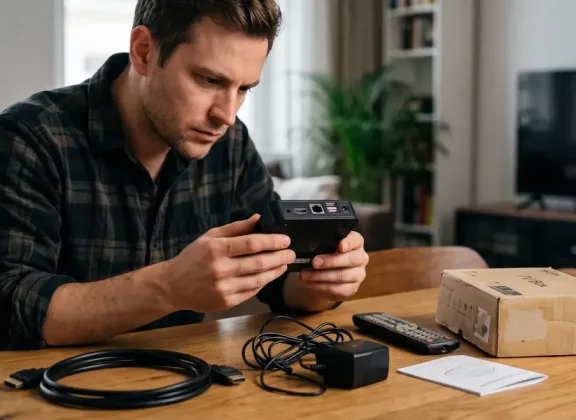
Purchasing a used IPTV box can be a practical way to reduce costs, particularly when you need another device for a second television or are looking for a model that is no longer sold new. But a lower price is only worthwhile when the set-top box is in good working order, is not restricted to a specific operator, and still has adequate software support.
The condition of a second-hand set-top box cannot always be judged by its appearance. A device with a clean case may still have worn storage, unstable Wi-Fi, damaged HDMI output, power problems, or cooling issues. In other cases, the hardware is perfectly functional, but the box is locked to a provider or uses firmware that is no longer maintained. Before buying, it is therefore worth checking both the physical condition of the device and its software status.
How to Check a Used IPTV Box Before Buying
Whenever possible, choose a seller who allows you to test the device before paying or offers a return option if a defect appears later. Refurbished electronics stores, marketplaces with buyer protection, and sellers with transparent return policies generally provide more protection than an informal sale.
Buying from a private owner is not necessarily a problem, but an in-person test is preferable. You should at least be able to confirm that the device powers on, reaches the interface, and operates normally before handing over the money.
Listings deserve extra caution when they contain only stock images, offer a price far below the usual market level, or include phrases such as “not tested” or “sold as is.” A seller who is unwilling to show the device running, provide system information, or share the serial number gives you considerably less information on which to base your decision.
Before arranging a purchase, ask for the full model designation, clear photos of the housing and connectors, the serial number, and preferably a photo of the device information screen. It is also useful to know how long the box has been in use, whether it has been repaired, whether custom or third-party firmware has ever been installed, and why the owner is selling it.
Main Risks of Buying a Second-Hand Set-Top Box
The biggest uncertainty with a used set top box is its operating history. A device may have been running continuously for several years, kept in a poorly ventilated cabinet, or used with an incorrect power supply. Long-term heat exposure and unstable power can shorten the life of components even if there are no obvious external signs of damage.
Software restrictions can be equally important. Some devices have an operator lock and are intended to work only with a particular service provider. Older boxes may no longer receive firmware updates, while current versions of streaming or IPTV applications may stop supporting an outdated operating system.
For this reason, verify device compatibility with your IPTV provider and the applications you plan to use before making a purchase. A technically working device is of little value if it cannot run the services you need.
The previous owner’s account data is another factor to consider. Personal accounts and settings should be removed before the device changes hands. When evaluating a used Android TV box, check that after an Android TV box factory reset it can be configured with a new account without requesting authentication details belonging to the previous owner.
Signs of a Problematic IPTV Box
Many common set top box problems can be identified during a short test. The device should boot consistently, navigate menus without frequent freezing, and maintain a stable HDMI connection. Occasional delays can occur on older hardware, but persistent lag, spontaneous restarts, or regular signal loss may indicate a more serious issue.
Temperature is another useful indicator. It is normal for a set-top box to become warm while operating, especially during video playback. However, pronounced Android TV box overheating accompanied by freezing, reduced performance, or automatic restarts should be treated as a warning sign.
Inspect the connectors and enclosure carefully. Cracked ports, damaged plastic, missing screws, marks indicating that the case has been opened, a smell of overheated electronics, or unstable power can all point to previous damage or repair.
The power adapter also deserves attention. Buzzing, excessive heat, damaged insulation, or intermittent operation may indicate that it is faulty. If the set top box not working correctly is already obvious during the demonstration, it is risky to assume that the problem will be simple or inexpensive to fix.
How to Test a Used Set-Top Box
Seeing the home screen is not enough to determine whether the device is healthy. Ideally, spend at least 15–20 minutes testing it under normal operating conditions.
Connect the box to a television using HDMI and restart it several times. Play video for an extended period and check whether playback remains stable. Test Wi-Fi connectivity and, when available, connect the Ethernet port as well.
USB ports, Bluetooth, audio output, and the remote control should be checked individually. If the manufacturer advertises 4K playback, use suitable content and confirm that the box can actually output the expected resolution without interruptions or excessive slowdown.
Basic device diagnostics should also involve launching and switching between several applications. Faults associated with internal storage, available RAM, or overheating may only become noticeable when the system is placed under greater load.
If you encounter an Android TV box not working correctly, begin with straightforward Android TV box troubleshooting. Restart the device and check its network connection, free storage space, and basic system settings. Avoid performing a complete reset before purchase unless the current owner has given permission.
Check Firmware and Software Support
Open the system information menu and verify the exact hardware model, storage capacity, operating system version, and firmware version. Compare these details with the specifications published by the manufacturer.
This step can reveal discrepancies between the device being sold and the description in the listing. In some product families, different hardware revisions may use similar cases or nearly identical model names while having different specifications or software support.
You should also visit the manufacturer’s official support resources and confirm whether the model is still maintained and whether official firmware updates remain available. This matters especially for Android TV and Google TV hardware, where application compatibility and platform support may be more important than the physical age of the set-top box.
Be cautious when a seller promotes unofficial firmware as an advantage because it is supposedly “faster,” “unlocked,” or “better optimized.” Modified firmware can create problems with updates, DRM, application compatibility, and overall system stability.
What to Ask the Seller For
A complete set is preferable. Ideally, the device should come with its original power adapter, remote control, and any cables required for normal operation.
The retail box and printed documentation are less important, but they can still be useful. Packaging often includes the precise model designation, serial number, hardware identifiers, and other information that can be compared with the label on the device and the system menu.
Pay particular attention to the power supply. An adapter with incorrect voltage, insufficient current, or poor voltage regulation can cause random restarts, boot failures, or unstable performance. These symptoms are easily mistaken for a problem with the set-top box itself.
If the seller advertises a specific amount of RAM or storage, 4K support, a particular Wi-Fi generation, or other technical capabilities, verify them independently. Check the system information and compare it with the manufacturer’s official documentation rather than relying only on the marketplace listing.
What You Cannot Fully Check Yourself
Even a thorough home test cannot reveal every aspect of the device’s hardware condition. Some defects remain hidden until the unit is disassembled or tested with specialized diagnostic equipment.
For example, it is difficult to evaluate the long-term health of internal flash storage, power circuitry, solder joints, or components affected by previous overheating. Earlier repairs may also leave no visible trace on the outside.
Extra caution is therefore advisable when the history of a device is unclear or the seller confirms that it has already been repaired. When buying a relatively expensive set-top box, having it inspected by a qualified service center can be worthwhile, particularly if there has previously been a problem with power, overheating, startup, or internal storage.
What to Do If Problems Appear After Purchase
If the device begins to behave incorrectly after purchase, start with the simplest possible causes. Try another HDMI cable, confirm that the power adapter is suitable, test the internet connection, and determine whether the problem occurs in one application or throughout the system.
Restarting the device can resolve temporary software issues. A standard factory reset may also help when settings or installed software are causing problems, although any important configuration should be saved beforehand.
More serious symptoms require a different approach. If the set-top box cannot boot, enters a restart loop, fails to detect its storage, becomes excessively hot, or repeatedly loses video output, it is better to consult an authorized service center or a technician familiar with this category of device.
Attempting to open the case or install firmware without sufficient experience can create additional faults and make later repairs more complicated.
Repair costs should also be considered in relation to the value of the box. On an older or inexpensive model, replacing internal storage, the mainboard, or power components may cost enough that purchasing another functional unit is the more economical option.
Checklist Before Buying a Used IPTV Set-Top Box
Before completing the purchase, check:
- the exact model and serial number, and compare the specifications with official manufacturer information
- whether there is an operator lock and whether the device is compatible with your IPTV service
- startup, HDMI output, Wi-Fi/Ethernet, USB, Bluetooth, audio, and remote-control operation
- stable video playback for at least 15–20 minutes without freezing, signal loss, or unexpected restarts
- the absence of excessive heat, damaged connectors, cracks, and other visible signs of wear
- the operating system and firmware version, together with the availability of official software support
- whether a factory reset can be performed and the box can subsequently be activated with a new account
- the presence of an appropriate power adapter, remote control, and necessary cables
- previous repair history, the reason for sale, and proof of purchase where available
A used IPTV box can be a sensible purchase, but the decision should be based on more than the asking price. A short inspection of the hardware, software version, support status, compatibility, and previous use can prevent far more expensive problems later. The fewer details a seller is prepared to share and the less opportunity you have to test the device, the greater the uncertainty. If important information cannot be verified, choosing another set-top box is usually the safer option.
